Introduction
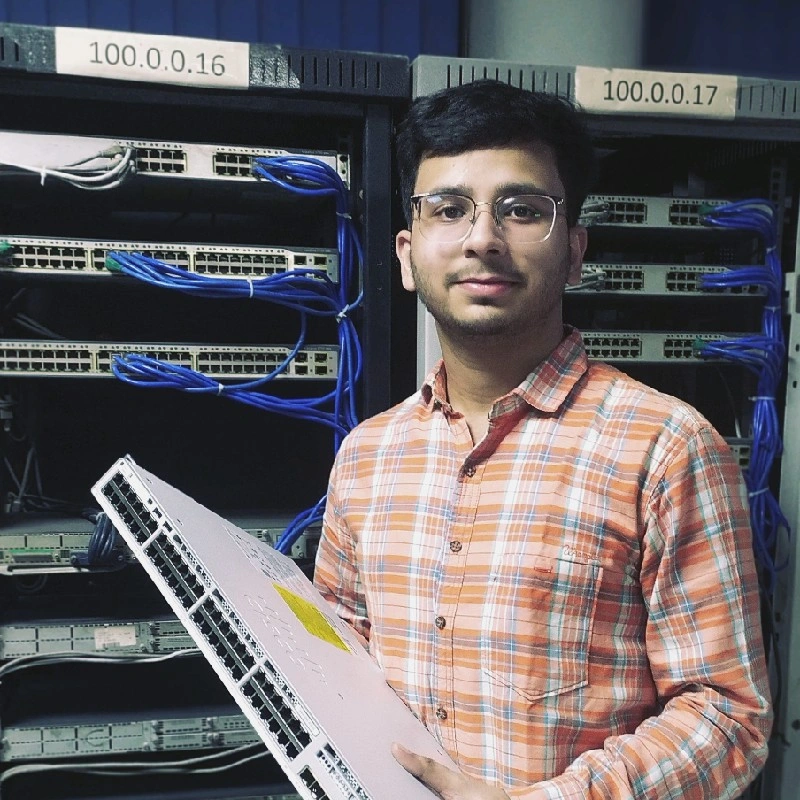
Nikunj Dwivedi
Education
About
Hi, I'm an IT Infrastructure Enthusiast pursuing CCNA and CCNP Enterprise training at Network Bulls, Gurgaon. I’m gaining practical exposure with network devices and simulations, improving my understanding of IT systems and services. With a background in Architecture and industry experience, I approach technical challenges with a structured and analytical mindset.
This site presents my CCNA Standard Enterprise Lab, created to document and showcase the skills I’ve been developing throughout my learning journey. I hope you enjoy exploring the project.
Project Overview
Aims
To create a CCNA based Master Topology with IT services that any small to medium organization would need for its operations like Internet Access, Storage, Hosting and Network Services servers.
To develop the ability to apply theoretical concepts in practical scenarios by designing a master topology and effectively troubleshooting challenges encountered in an enterprise environment.
To showcase professional documentation that highlights the Network Design, Implementation, Troubleshooting, and Documentation competencies I have developed throughout my CCNA training.
Objectives
- Internet access for all users in Enterprise.
- Centralized storage for sharing files.
- Segmented access per department.
- Inter-branch connectivity and services.
- Routing and switching as per design.
- DHCP–DNS for host provisioning.
- Local NTP, Syslog, and FTP services.
- Shared storage and internal hosting.
- Limit internal exposure to Internet.
- Enforce controlled user access.
- Maintain backups and logs for recovery.
- Secure centralized admin access.
Journey
I completed my B.Arch in 2023 and worked for two years in the AEC industry. Exploring different roles helped me understand that a technical career suited me better, and among IT domains, Networking emerged as the most engaging path for me.
I began with online learning to build my basics, then moved into structured training at Network Bulls, Gurgaon. Hands-on practice with Cisco equipment and simulations has significantly strengthened my understanding and confidence.
Since then, I have completed my CCNA training and am developing this project to showcase my skills. I am currently pursuing CCNP Enterprise training while expanding my lab portfolio and preparing for opportunities to start my IT career.
Network Topology
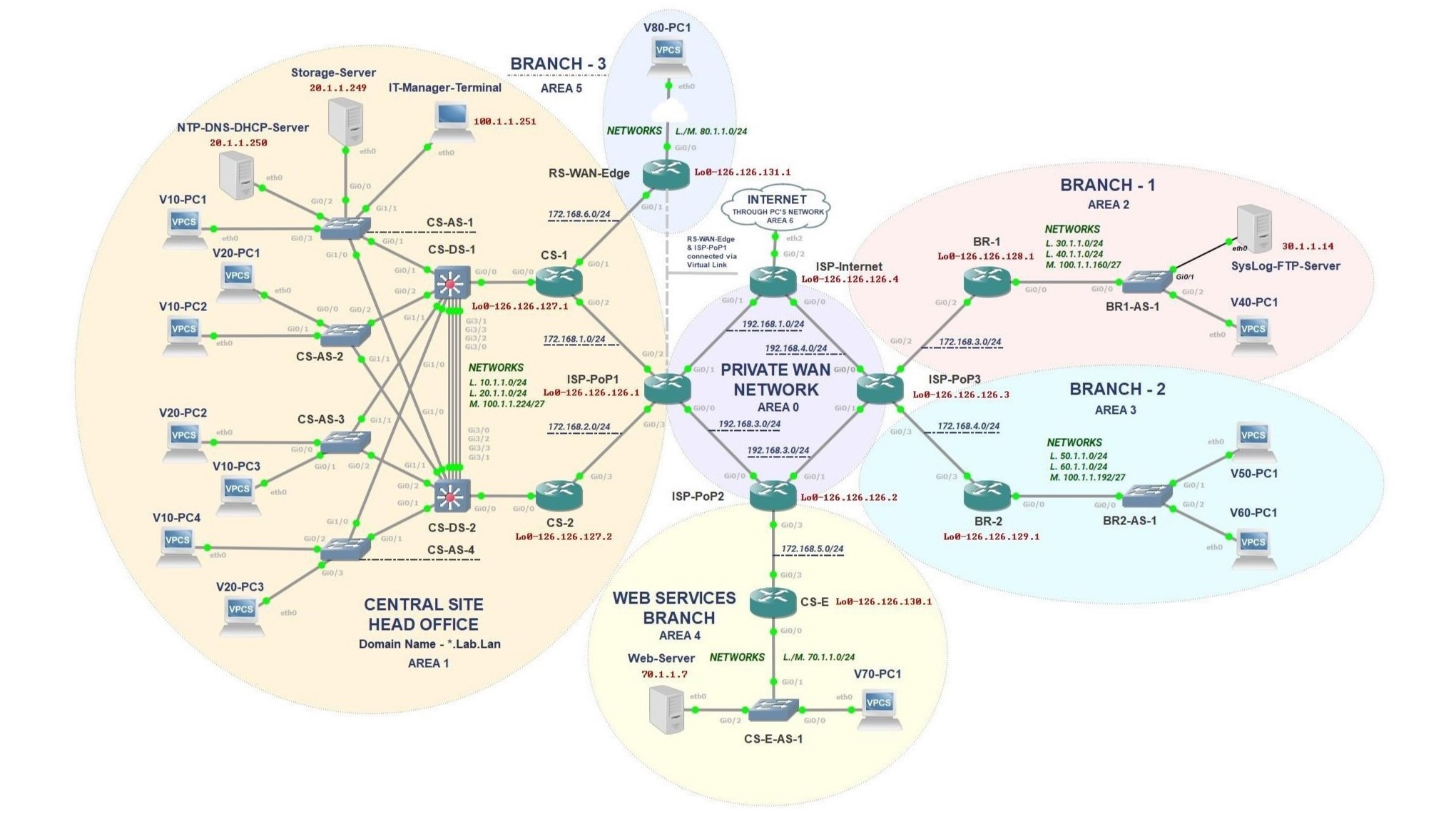
Description
This lab topology represents a services integrated Enterprise network designed to simulate real-world multi-site operations. It includes a Central Head Office, multiple. Branch Offices, a Web Services zone, and a Private WAN backbone interconnecting all sites. Each segment features Routing, Switching, Linux Servers, and End-user devices. to demonstrate various networking and server application. This environment provides a comprehensive platform for practicing troubleshooting, configuration, and network design skills aligned with CCNA-level scenarios.
Network Architecture
Core Site
Hierarchical Core, Distribution and Access layered network hosting the main IT team and key enterprise services (DHCP, DNS, Storage, NTP) with redundancy to ensure uptime.
Branch Sites
Remote locations with local routing/switching, connected to the Core via private WAN to extend enterprise access, host web/record services, and support users off-site.
ISP Network
Simulated ISP with multiple PoPs to manage inter-area traffic, provide internet reachability, forward website traffic to server and isolate internal enterprise network.
Device Configurations
Click "Configurations" button above to select a device...
Lab Documentation
Click on Sub-Headings to see related information.
Topology Overview
Click to see Details
- Multi-site enterprise network with Central Site, Branch Offices, Private WAN, and a Web Services Zone.
- Central Site hosts Core, Distribution and Access layer design, and Enterprise Services with some services in other Branches.
- Private WAN provides connectivity between all branches and their access to the Internet.
- A central IT-Manager terminal provides control and secure management.
Unique Features
Click to see Details
- This lab is fully integrated with Linux server infrastructure for various services.
- I can take backup for all devices and servers configuration to my PC/Lab host through FTP.
- This portfolio website is hosted on my lab's internal web server reachable over the Internet whenever my PC and Lab is active.
- The Linux servers are reachable via Internal web brower and any PC in the lab can browse the Internet.
Layer 2 – Switching Features
VLAN & Subnetting
- Central Site: VLAN10 (10.1.1.0/24) Users, VLAN20 (20.1.1.0/24) Servers & Privileged Users.
- Branch 1: VLAN30 (30.1.1.0/24) Server, VLAN40 (40.1.1.0/24) Users.
- Branch 2: VLAN50 (50.1.1.0/24) Users, VLAN60 (60.1.1.0/24) Users.
- Branch 3: VLAN80 (80.1.1.0/24) Remote Users.
- Web Zone: VLAN70 (70.1.1.0/24) Developers & Web Server.
- Management VLAN100: Central (100.1.1.224/27), Branch 1 (100.1.1.192/27), Branch 2 (100.1.1.160/27).
- Router access via Loopback 0 with 126.126._._/32 addresses.
Trunking, EtherChannel & STP
- 802.1Q trunking configured on all switch uplinks and EtherChannel.
- CS-DS-1 and CS-DS-2 use 4-port EtherChannel (Po1) between them to increase bandwidth and provide distribution layer redundancy.
- CS-DS-1 is Root Bridge for VLAN10 & VLAN100; CS-DS-2 for VLAN20. This ensures load distribution through VLAN design.
STP Protection
- Loop Guard enabled on trunk uplinks and Port-Channel links.
- Root Guard on Distribution Switch prevents rogue root bridges.
- BPDU Guard enabled on all access ports.
- PortFast configured on access ports for fast convergence.
Port Security
- Sticky MAC learning with 2 MAC address limit on user ports with violation mode restrict and single MAC on server ports with violation mode shutdown.
Layer 3 – Routing Features
OSPF Multi-Area Design
- ISP-PoPs form Backbone Area 0.
- Central Site Core (CS-1, CS-2) operates in Area 1.
- Branch 1: Area 2, Branch 2: Area 3, Web Zone: Area 4, Branch 3: Area 5.
- Internet connection via Area 6.
OSPF Virtual-Link
- Virtual-Link between RS-WAN-Edge (126.126.131.1) and ISP-PoP1 (126.126.126.1) extends Area 0 reachability.
- RS-WAN-Edge provides remote user access via virtual-link due to port limitations and maintains network domain separation.
HSRP Default Gateways
- HSRP configured on VLAN sub-interfaces at CS-1 and CS-2.
- VLAN10: 10.1.1.1 (CS-1 primary, CS-2 backup).
- VLAN20: 20.1.1.1 (CS-2 primary, CS-1 backup).
- VLAN100: 100.1.1.225 (CS-1 primary, CS-2 backup).
- Interface tracking: CS-1 tracks G0/2, CS-2 tracks G0/3; priority reduction enables automatic failover and preemption.
Inter-VLAN & WAN Routing
- Inter-VLAN routing is enabled via sub-interfaces on each Branch router.
- Branch routers advertise local VLANs into OSPF.
- ISP core routers propagate routes between sites.
- ISP-Internet propagates default route into the internal network and directs traffic to Internet via default gateway of the network my PC is on.
- PAT on ISP-Internet with port forwarding for HTTP and FTP to internal servers.
Network Services
DHCP Server
- Full DHCP scopes for VLANs: 10, 20, 30, 40, 50, 60, 70, 80, 100.
- Uses Dynamic DNS updates with TSIG key.
- Along with IP address and default gateway, it also binds and updates DNS records for local domain named lab.lan and provides NTP server's IP for time syncing in the Network.
- Maintains leases for all the devices in different subnets with hostname appended with domain name.
- Enabled via ISC DHCP Server daemon (dhcpd) on AlmaLinux.
DNS Server
- Authoritative for lab.lan forward zone and all reverse zones for subnets in the network.
- Hosts local domain name records for every router, switch, server and PC.
- Forwards DNS queries not found in local files to 8.8.8.8 & 8.8.4.4 (Google DNS Servers) and maintains local records for external resolved domains as well.
- Maintains dynamic IP address mapping to domain names for all the devices in different subnets in the internal network.
- For devices which do not get IP address via DHCP, static entries have been entered in the configurations files to resolve their hostname in the local domain.
- Enabled via BIND9 daemon (named) on AlmaLinux.
NTP Server
- Serves time to all enterprise networks by syncing itself to reliable sources.
- Set to Stratum 10 for internal stability.
- Uses public pool (0.pool, 1.pool) as upstream.
- Enabled via Chrony daemon (chronyd) on AlmaLinux.
Application/Data Services
SysLog & FTP Server
- SysLog collects system logs from all devices with Hostname and IP Address, enabling network monitoring, better incidence response.
- FTP server keeps backup for IOS configurations and transfers files between devices, helping to maintain configuration records and revert back to last working state in case of misconfiguration, device failure or system error.
- FTP service enabled via vsftpd daemon on AlmaLinux.
- SysLog service enabled via rsyslog daemon on AlmaLinux.
Storage Server
- It acts as the enterprise file storage system. Provides shared directories for internal users and IT operations.
- Two network drives have been created named General for all users and Management for IT/management staff.
- Management can access both drives while users are restricted to General drive only.
- Enabled via SAMBA daemon (smbd) on AlmaLinux.
Web Server
- Hosts the enterprise website and its related documentation.
- This portfolio website is hosted on my internal web server and becomes publicly accessible whenever my lab is online.
- For consistent access, I have uploaded this portfolio website on GitHub also.
- Ngrok service creates a secure public URL that forwards incoming HTTP traffic to my PC, which then passes it to my Lab’s NAT router. The NAT router performs PAT and forwards the request to the internal web server on port 80.
- Enabled via Apache Web Server daemon (httpd) on AlmaLinux and own website.
Zone-Wise Summary
Central Site
- Central site with max users and hosts core enterprise services including DHCP, DNS, NTP, and Storage servers.
Branch 1
- Provides access for VLAN30/40, and hosts infrastructure services like Syslog and FTP for the entire enterprise.
Branch 2
- Enables user access for VLAN50/60, extending enterprise reach to remote site.
Branch 3
- Supports isolated remote users through OSPF Virtual link.
Web Server Zone
- Hosts the enterprise’s public-facing web service in a segregated network for security and controlled access.
ISP Core (Simulated Provider)
- Serves as the backbone linking all sites & Internet access.
Security & Management
Access Control & Security
- ACL “Access” applied on VTY lines on all devices restricts management access via Telnet/SSH to 100.1.1.251 (IT Manager Terminal) and 126.126.130.1 (CS-E Router) only.
- BPDU, Root and Loop Guard prevent loops and rogue devices to initiate changes in the topology
- Sticky MAC prevents unauthorized devices to join the network with MAC limit per port depending on port role.
- PAT enabled on the ISP-Internet router isolates the private Internal network to public/outside network.
- Servers are only accessible via IT Manager Terminal and other servers through SSH or Web Browser to access its GUI.
- Ports not in use are administratively shutdown on all devices.
Monitoring & Backup
- Centralized Syslog and NTP synchronization via dedicated servers provides Monitoring capability.
- Configuration backup are maintained on FTP server to facilitate fast recovery.
Features
Extracting Backup configurations to Laptop from Lab's FTP Server
Web Server Connectivity to Internet and Cloudflare hosted Website Access
PC in the Lab Accessing Internet and Servers GUI
Central Access from IT-Manager Terminal
Network Services
Network Services
DHCP & DNS Services
Dynamic Host Configuration Protocol: Assigns IP addresses, subnet masks, default gateways, and DNS servers to network devices alongside mapping hostnames to leases in DNS zones.
- Centralized IP address management across all sites.
- Reduces manual configuration errors.
- Supports DHCP relay for remote subnets.
- Configured with lease times and exclusion ranges.
- Enabled via ISC DHCP Server daemon (dhcpd) on AlmaLinux.
Domain Name System: Translates human-readable domain names into IP addresses for both internal and external network communication.
- Internal DNS server for local domain resolution.
- Forwards external queries to ISP DNS servers.
- Improves network performance with DNS caching.
- Provides name resolution for internal services.
- Enabled via BIND9 daemon (named) on AlmaLinux.
NTP (Network Time Protocol)
Network Time Protocol: Synchronizes time across all network devices for accurate logging and time-sensitive operations.
- Ensures consistent timestamps across all devices.
- Critical for log correlation and troubleshooting.
- Hierarchical NTP architecture with master and client devices.
- Synchronized with external NTP servers.
- Enabled via Chrony daemon (chronyd) on AlmaLinux.
Application/Data Services
SysLog and FTP
System Logging: Centralized logging system that collects and stores log messages from network devices.
- Centralized log collection from all routers and switches.
- Real-time monitoring of network events and errors.
- Facilitates troubleshooting and security auditing.
- Enabled via rsyslog daemon on AlmaLinux.
File Transfer Protocol: Enables file transfer between network devices and provides centralized file storage.
- Centralized repository for configuration backups.
- Facilitates IOS image distribution and upgrades.
- Secure file sharing across the network.
- Enabled via vsftpd daemon on AlmaLinux.
Storage and Web Hosting
Network Storage: Provides centralized network-attached storage for data management and sharing.
- Centralized data storage accessible from all sites.
- Enabled via SAMBA daemon (smbd) on AlmaLinux.
- Used for shared resources and documentation.
HTTP/HTTPS Services: Hosts website from both internal and external access.
- Hosts company's website.
- Provides documentation and resource access.
- Enabled via Apache Web Server daemon (httpd) on AlmaLinux.
Lab Quiz
Interactive Lab Quiz
Test your understanding of the CCNA lab topology, protocols, and configurations with 10 comprehensive questions.
Limitations
Understanding the constraints and limitations of this lab is important for the learning process and future improvements.
Hardware & Resource Constraints
Physical & Hardware Limitations
- Selection of the IOS image for devices at the start and my system's hardware constraints restricted the scale of my lab from adding more devices, backup servers and features.
- Practice in virtualized environment cannot fully replicate experience of issues faced in a real lab setup.
Network & Protocol Limitations
Protocol & Feature Constraints
- Features like VoiceVLAN and Wireless devices could not be implemented due to GNS3 limitation.
- Simplified WAN simulation using OSPF implemented which in real scenario will be different.
- Concepts like DHCP Snooping and ARP Inspection could not be implemented due to Lab enviornment and CCNA based HSRP configuration.
- EIGRP, Redistribution and Floating Static Route could also be used.
- Concepts like GRE Tunnel and IP Sec (CCNP Concepts) can improve this lab by overlaying tunnel over ISP network and providing security to traffic between sites.
- HSRP could not be moved to the Distribution layer to offload Inter-VLAN routing from the Core. Doing so would require enabling routing combined with IP SLA and track objects to monitor uplinks for failover.
- If one Distribution Switch goes down, the ISP-PoP1 router is not currently able to remove/manipulate the route directed towards the offline distribution switch without IP SLA.
Future Improvements
Enhancements for Future Lab Setups
- Choose lightweight IOS for fast convergence and scalable topology. Also, avoid using heavy IOS without specific design purpose.
- Expanding the topology to include more diverse scenarios and features available in CCNP Enterprise.
- Creating a similar lab more advanced Enterprise services.
- Implementing more advanced Networking concepts such as BGP, MPLS etc.
- Adding more security features to network and authentication in various contexts.
Important Note
Identifying these limitations helped me understand my knowledge gaps and clarify what to focus on as I progress toward CCNP Enterprise. Building this integrated lab strengthened my grasp of production networks and enhanced my practical networking skills. I remain open to identifying additional CCNA-level limitations or features I may have overlooked in this lab and exploring their solutions.
Conclusion
Thank You for Visiting!
This project reflects my transition to Network Engineering, showcasing the understanding of CCNA based topics I have gained through my journey. I sincerely thank the trainers, peers, and Network Bulls for providing practical experience, guidance, and a motivating environment to shape my journey. I also extend my gratitude to the creators of tools and platforms such as GNS3, ChatGPT, Ngrok, Kiro, and GitHub, which enabled me to learn and apply these technologies independently.
I am actively seeking an opportunity in IT Infrastructure and Network Engineering roles. If you find my work relevant & believe a suitable opportunity exists, I would be interested to discuss the same. Please find the contact details mentioned below.
Linkedin - linkedin.com/in/anonymous4527
Email - nikunjdwi5@gmail.com